SYSML V2 TUTORIAL
Modelling a Powertrain in SysML v2
Block Definition & Internal Block Diagrams
A step-by-step walkthrough of modelling a complete vehicle powertrain in SysML v2. We build the Block Definition Diagram (the structure) and the Internal Block Diagram (the wiring), and see how the tool renders both from the same semantic model.
Introduction: The Powertrain Model
In this tutorial we model a complete vehicle powertrain in SysML v2. The powertrain is a classic systems-engineering running example: it has a clear structure (engine, fuel tank, transmission, axle, wheels), a clear flow (fuel in, torque out), and enough complexity to exercise the full range of SysML v2 constructs — port definitions, attribute definitions, block definitions with compartments, block usages with boundary ports, and port-to-port connectors.
We build two diagrams: the Block Definition Diagram (BDD), which shows the structure of the system, and the Internal Block Diagram (IBD), which shows how the parts are wired together. Both diagrams are rendered by the tool from the same semantic model — they are not hand-drawn.
The Building Blocks: Definitions
Before we can wire anything together we need to define the building blocks of the system. In SysML v2 these come in three flavours: port definitions, attribute definitions, and block definitions.
Port Definitions
A port definition names a kind of boundary port — a point where a part interacts with its environment or with other parts. Our powertrain has ten port definitions, one for each boundary port in the system:
- engineFuelIn / engineTorqueOut — the engine's fuel input and torque output
- tankFuelOut — the fuel tank's fuel output
- transTorqueIn / transTorqueOut — the transmission's torque input and output
- axleTorqueIn — the axle's torque input from the transmission
- axleWheelFront / axleWheelRear — the axle's torque outputs to the front and rear wheels
- frontAxleIn / rearAxleIn — the wheels' torque inputs from the axle
Attribute Definitions
An attribute definition names a kind of named value — a property of a part. Our powertrain has three attribute definitions: ratedPower (the engine's rated power), gearRatio (the transmission's final gear ratio), and wheelDiameter (the wheel's diameter).
Block Definitions
A block definition is the 'blueprint' for a part of the system. It has a name, an optional ID badge (e.g. # BD-001), an optional doc comment, and compartments. The compartments are where the block's features live:
- values — named attributes (e.g. the engine's displacement and fuelType)
- operations — named operations with in/out directions (e.g. the engine's start and stop)
- constraints — invariant expressions that must hold (e.g. displacement > 0)
- properties — typed attributes that reference an attribute definition (e.g. the transmission's finalGearRatio : gearRatio)
The Block Definition Diagram (BDD)
The Block Definition Diagram (BDD) shows the definitions — the 'blueprints' of the system. Our powertrain has three kinds of definition, and we present each in its own diagram so the structural view stays readable: the block (part) definitions, the port definitions, and the attribute definitions. All three are rendered from the same semantic model; only which definitions are shown changes.
Block (Part) Definitions
A block definition is the 'blueprint' for a part of the system. It has a name and one or more compartments, where the block's features live: values (named attributes), operations (with in/out directions), constraints (invariant expressions), and properties (typed attributes that reference an attribute definition). The engine, for example, has values (displacement, fuelType), operations (start, stop), and a constraint (displacement > 0); the transmission adds a property (finalGearRatio : gearRatio).
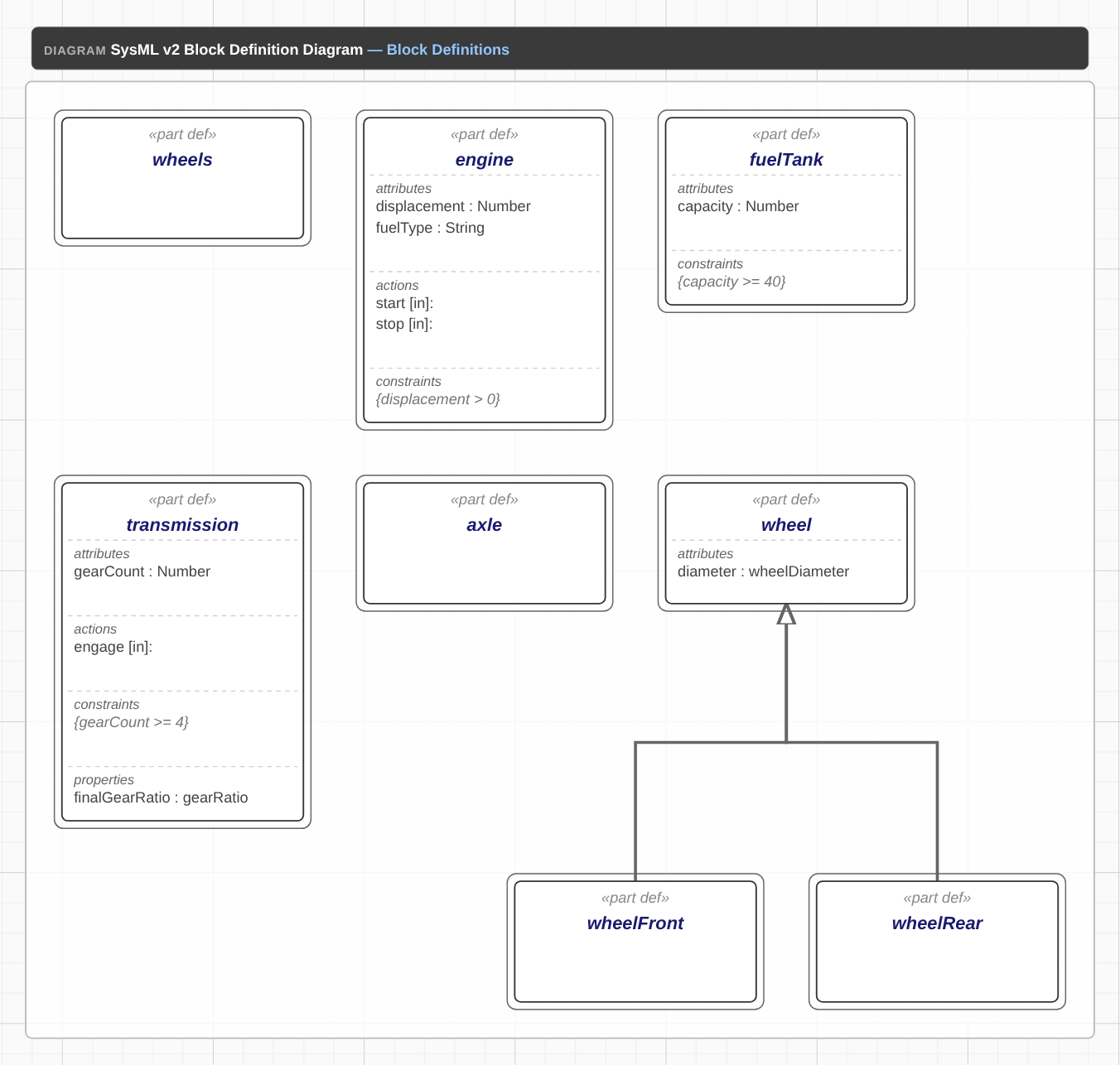
// Block definitions: the blueprints of each part
block def engine {
  doc "Four-stroke internal combustion engine";
  values: displacement : Number;
  values: fuelType : String;
  operations: start (in);
  operations: stop (in);
  constraints: "displacement > 0";
}
block def fuelTank {
  doc "Fuel storage tank";
  values: capacity : Number;
  constraints: "capacity >= 40";
}
block def transmission {
  doc "Automatic transmission";
  values: gearCount : Number;
  properties: finalGearRatio : gearRatio;
  operations: engage (in);
  constraints: "gearCount >= 4";
}
block def axle {
  doc "Drive axle with differential";
}
block def wheel {
  doc "Wheel and tire assembly";
  values: diameter : wheelDiameter;
}
block def wheelFront
block def wheelRear
wheelFront :> wheel;
wheelRear :> wheel;
Port Definitions
A port definition names a kind of boundary port — a point where a part interacts with its environment or with other parts. The ten port definitions below are the 'interface types' of the powertrain: one for each boundary port that appears in the IBD. Shown on their own, you can see the full set of interfaces the system exposes.
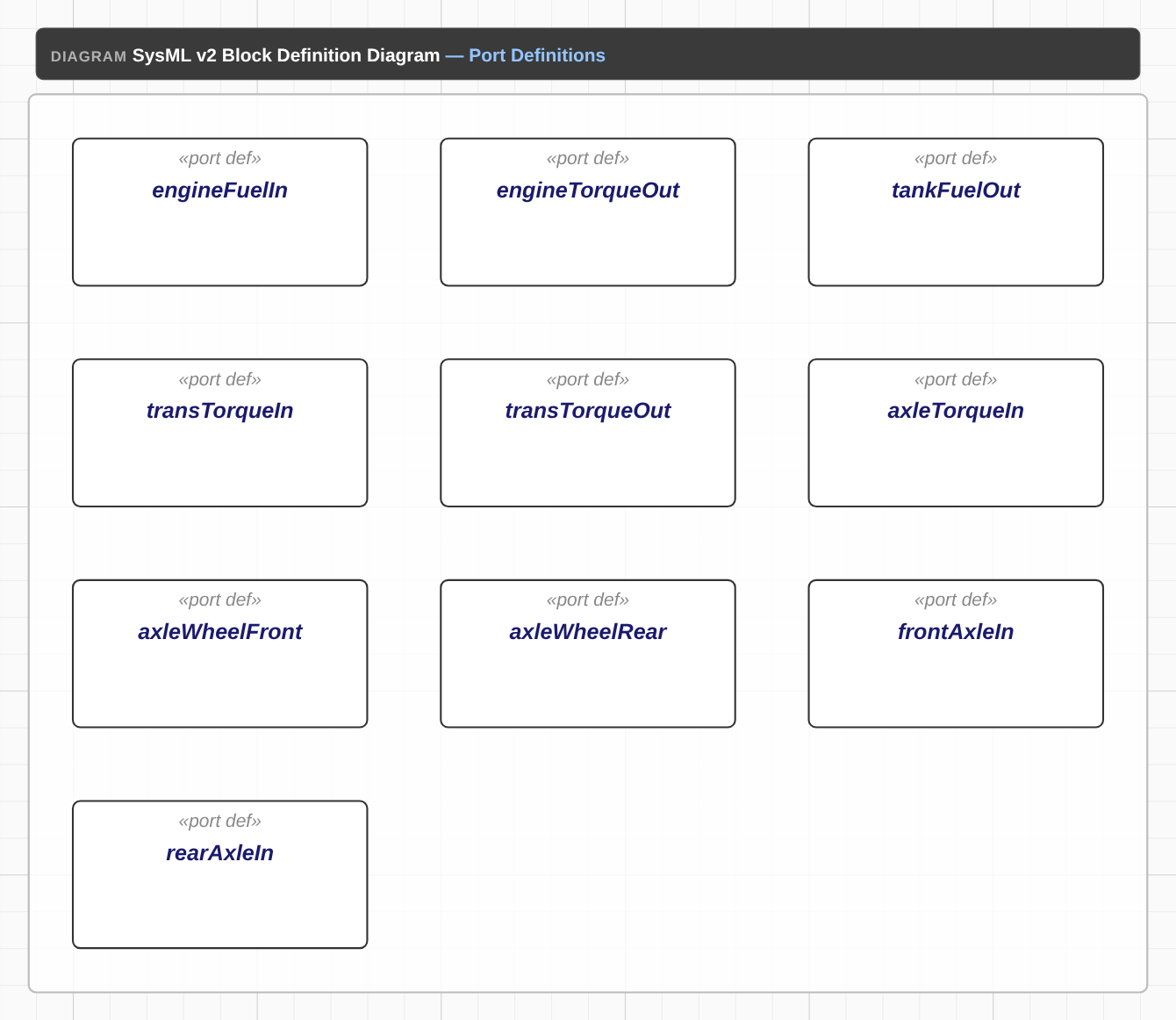
// Port definitions: one per boundary port
port def engineFuelIn
port def engineTorqueOut
port def tankFuelOut
port def transTorqueIn
port def transTorqueOut
port def axleTorqueIn
port def axleWheelFront
port def axleWheelRear
port def frontAxleIn
port def rearAxleIn
Attribute Definitions
An attribute definition names a kind of named value — a property of a part. The three attribute definitions below are the 'property types' of the powertrain: ratedPower (the engine's rated power), gearRatio (the transmission's final gear ratio), and wheelDiameter (the wheel's diameter). Block definitions reference these as typed properties — for example, the transmission's finalGearRatio : gearRatio.
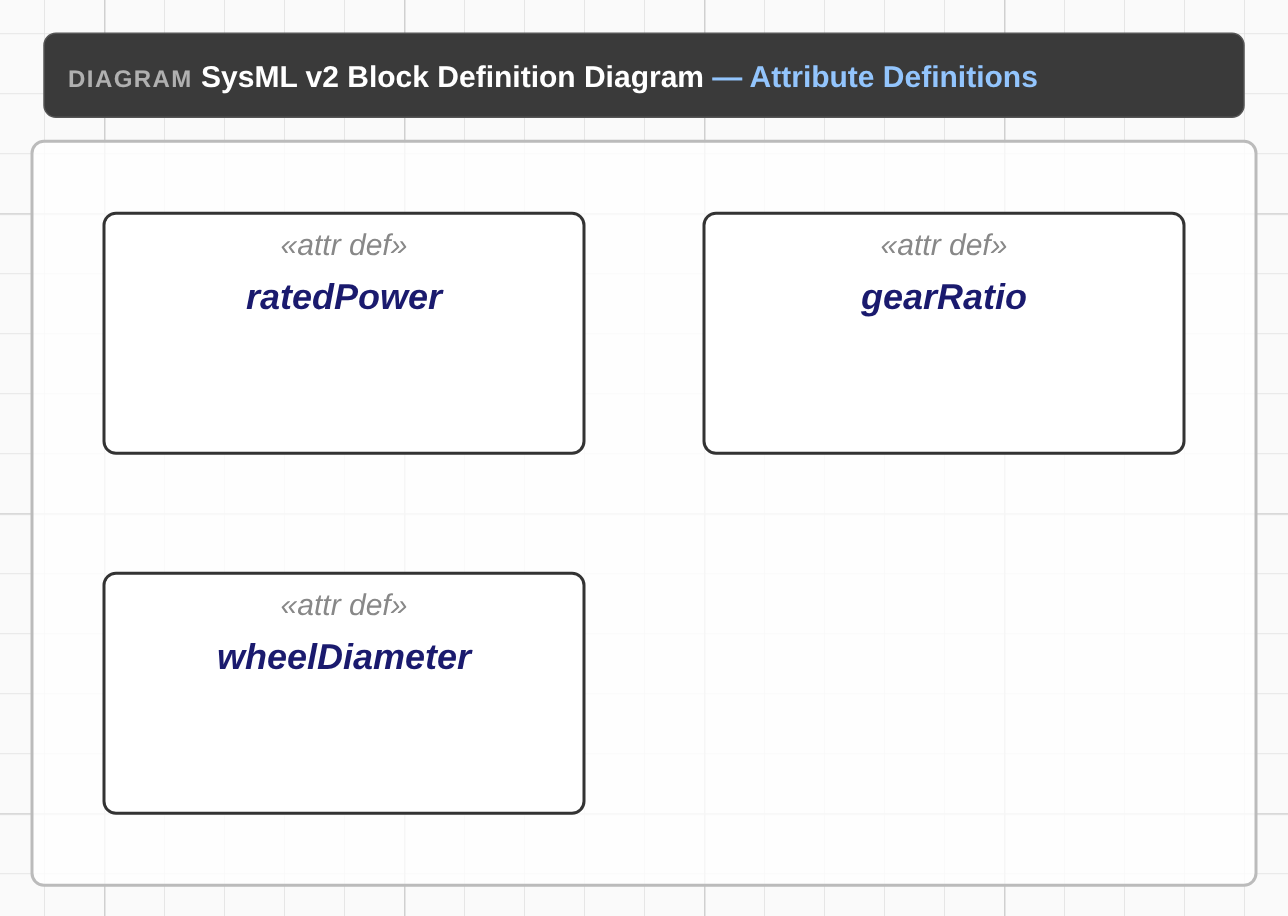
// Attribute definitions: named-value property types
attribute def ratedPower
attribute def gearRatio
attribute def wheelDiameterThe Internal Block Diagram (IBD)
The Internal Block Diagram shows the block usages and their connections. It is the 'wiring diagram' of the system — the interconnection view.
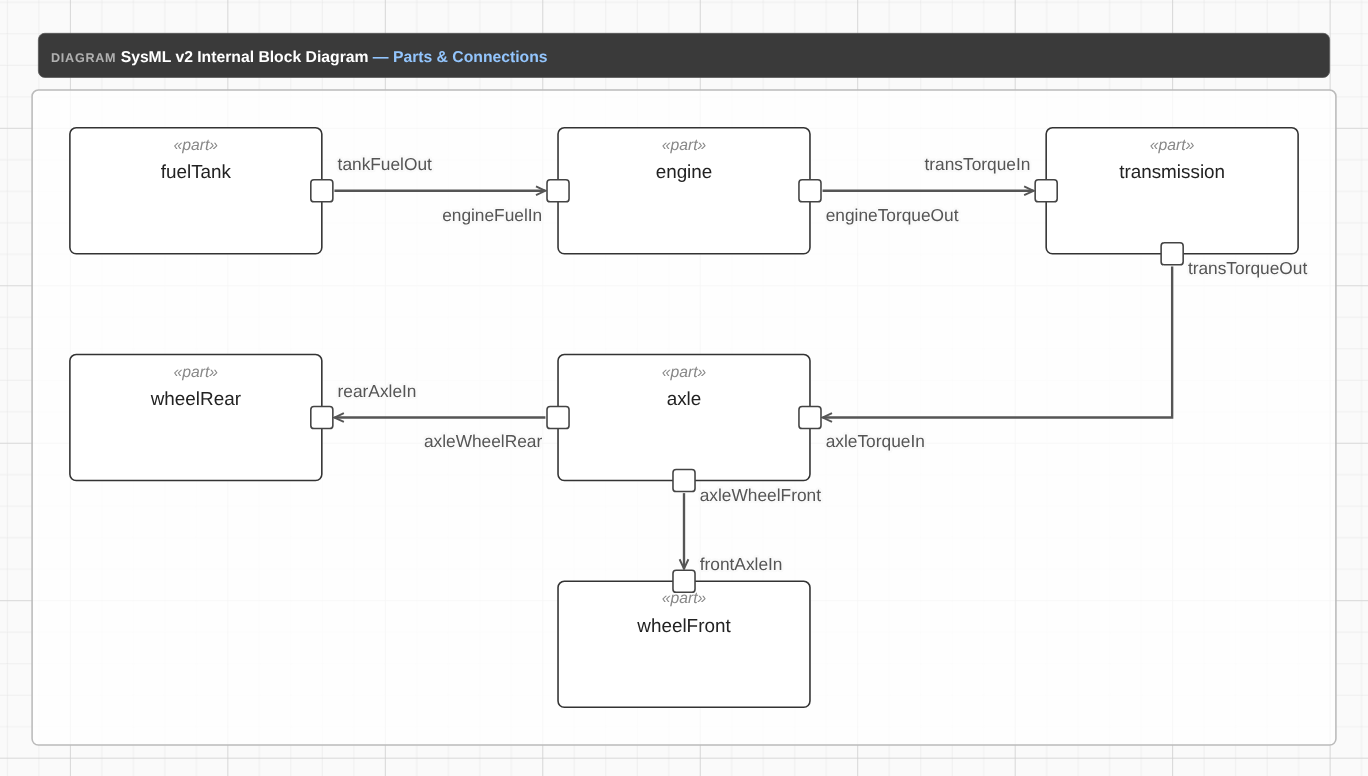
// Block usages (IBD cells) with nested boundary ports
block engine {
  port engineFuelIn;
  port engineTorqueOut;
  attribute ratedPower;
}
block fuelTank {
  port tankFuelOut;
}
block transmission {
  port transTorqueIn;
  port transTorqueOut;
}
block axle {
  port axleTorqueIn;
  port axleWheelFront;
  port axleWheelRear;
}
block wheelFront {
  port frontAxleIn;
}
block wheelRear {
  port rearAxleIn;
}
// Multiplicity + subsets demo: a collection of front wheels.
block wheels [1..4] subsets wheelFront;

// Connections (port-to-port)
connect tankFuelOut -> engineFuelIn;
connect engineTorqueOut -> transTorqueIn;
connect transTorqueOut -> axleTorqueIn;
connect axleWheelFront -> frontAxleIn;
connect axleWheelRear -> rearAxleIn;
Reading the IBD
Each block usage in the IBD has boundary ports (the half-circle stubs on the block's edge) and, where present, attributes. The connectors show how the blocks are wired together. In our powertrain the main flow is:
- Fuel flows from the fuel tank (tankFuelOut) to the engine (engineFuelIn)
- Torque flows from the engine (engineTorqueOut) to the transmission (transTorqueIn) — a directed connection, shown with an arrowhead
- Torque flows from the transmission (transTorqueOut) to the axle (axleTorqueIn)
The axle then distributes torque to the wheels via the axleWheelFront and axleWheelRear ports, which connect to the frontAxleIn and rearAxleIn ports on the wheel usages. The wheels usage also demonstrates multiplicity ([1..4]) and the subsets relationship (it subsets the wheelFront usage).
Definitions vs Usages
One of the key shifts in SysML v2 (compared to v1) is the clear, first-class distinction between definitions and usages. This is the 'class/instance' distinction, made explicit in the language.
Definitions (the 'classes')
Definitions are the 'blueprints'. They define the structure of the system. In our powertrain, the block definitions (engine, fuelTank, transmission, axle, wheel, wheelFront, wheelRear, wheels) are the definitions. They live in the BDD.
Usages (the 'instances')
Usages are the 'instances'. They reference the definitions and add specific ports and attributes. In our powertrain, the block usages (engine, fuelTank, transmission, axle, wheelFront, wheelRear, wheels) are the usages. They live in the IBD.
Common Pitfalls
Having modelled systems in both SysML v1 and v2, here are the mistakes we see most often when people first move to v2:
- Treating a block as both a definition and a usage — in v2 a block definition and a block usage are distinct; the usage references the definition
- Forgetting to define ports before using them — every boundary port in the IBD needs a corresponding port definition
- Confusing the values compartment with the properties compartment — values are untyped attributes; properties are typed attributes that reference an attribute definition
- Using the wrong connector direction — a directed connector (->) means the signal flows one way; an undirected connector (..) means it can flow both ways
- Naming usages differently from their definitions — the parser binds a usage to a definition of the same name (scope-aware), so each usage needs a matching definition
What Comes Next
This tutorial covered the BDD and IBD for the powertrain model. The next tutorials in the SysML v2 series go deeper:
- From SysML v1 to v2 — the migration story: block/compartments vs part/features, and what changes for v1 customers
- Interfaces and Connections in SysML v2 — an IBD deep-dive: ports, connectors, subsetting and specialization