SYSML V2 TUTORIAL
Interfaces and Connections in SysML v2
Ports, Connectors, Subsetting & Specialization
A step-by-step deep-dive into how SysML v2 ties a system together: ports as interface types, typed port usages, the four connector forms, and the subsetting/specialization relationships. Every diagram is rendered by the tool from the same semantic model, never hand-drawn.
Introduction: The Sensor-Bus Model
In this tutorial we look at how SysML v2 ties a system together. Our running example is a vehicle sensor bus: a temperature sensor and a pressure sensor feed their signals into a central sensor bus, which forwards them to a dashboard display. A power supply feeds the bus and the display. It is small enough to read in one sitting, but it exercises every 'interfaces and connections' construct in the language: ports as interface types, typed port usages, the four connector forms, and the subsetting and specialization relationships.
We build on the powertrain model from the first tutorial in this series. Where that tutorial introduced the Block Definition Diagram (the structure) and the Internal Block Diagram (the wiring), this one goes deeper on the wiring: the ports that form the boundary of each part, the connectors that link them, and the relationships that let one port be a kind of another, or one collection of parts be a subset of another.
Ports as Interface Types
A port definition names a kind of boundary port — a point where a part interacts with its environment or with other parts. In SysML v2 these port definitions are the 'interface types' of the model: they name the kind of signal or interaction that crosses a boundary, independently of any particular part. Our sensor bus has five port definitions:
- sensorSignal — the generic sensor signal (the base interface type)
- temperatureSignal — a temperature reading, a kind of sensorSignal
- pressureSignal — a pressure reading, a kind of sensorSignal
- busChannel — a channel on the central bus
- powerFeed — a power connection
Note the first three: temperatureSignal and pressureSignal are not standalone. Each specializes the generic sensorSignal. That gives us a small hierarchy of interface types — a base 'sensor signal' interface, with two specializations for the two physical quantities we measure. Shown on their own, the port definitions reveal the full set of interfaces the system exposes, and how they relate.
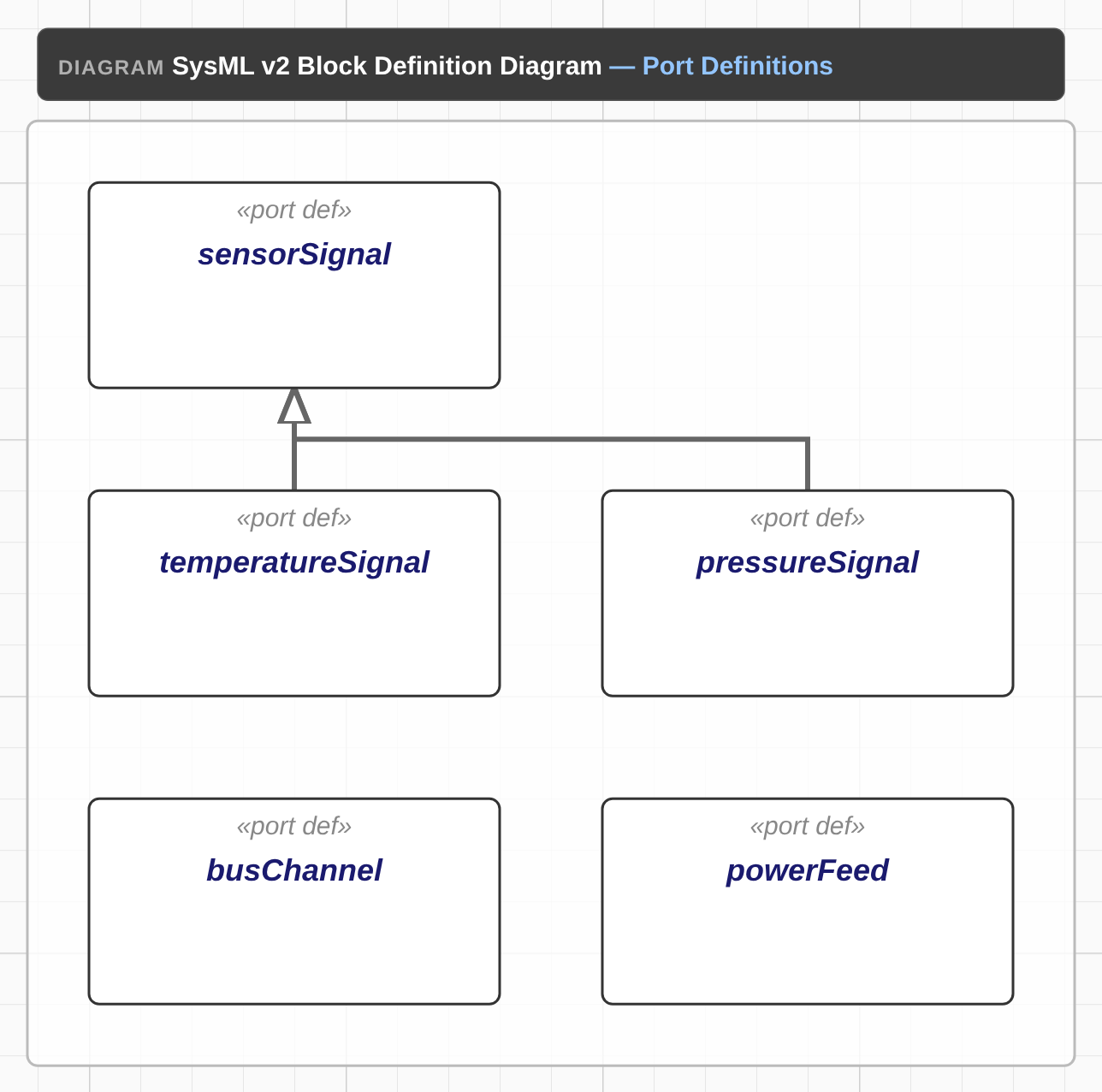
// Port definitions: the interface types
port def sensorSignal
port def temperatureSignal
port def pressureSignal
port def busChannel
port def powerFeed

// Port specialization: the temperature and pressure signals are kinds
// of the generic sensor signal.
temperatureSignal :> sensorSignal;
pressureSignal :> sensorSignal;Typing the Ports
Defining the interface types is only half the story. Each part then declares the boundary ports it actually has, and types each one to an interface. In SysML v2 a port usage is typed with the `: Type` reference: `port p : T;` says 'this boundary port p is an instance of the interface type T'.
In our sensor bus, the temperature sensor exposes a single boundary port, tempSignalOut, typed to temperatureSignal. The sensor bus exposes three signal channels (busInTemp, busInPressure, busOut) all typed to busChannel, plus a power input (busPowerIn) typed to powerFeed. The dashboard display has a signal input (displayBusIn : busChannel) and a power input (displayPowerIn : powerFeed). The power supply exposes powerOut : powerFeed. Every boundary port in the model is typed to one of the five interface types from the previous section.
// Typed port usages: each boundary port is typed to an interface
block temperatureSensor {
  port tempSignalOut : temperatureSignal;
}
block pressureSensor {
  port pressureSignalOut : pressureSignal;
}
block sensorBus {
  port busInTemp : busChannel;
  port busInPressure : busChannel;
  port busOut : busChannel;
  port busPowerIn : powerFeed;
}
block dashDisplay {
  port displayBusIn : busChannel;
  port displayPowerIn : powerFeed;
}
block powerSupply {
  port powerOut : powerFeed;
}Connector Forms
A connector links two or more ports. SysML v2 gives us four spelling forms, and our sensor bus uses all four. The form you pick is a statement about the nature of the connection — whether it is directional, whether it is a plain reference, or whether it joins more than two ports at once.
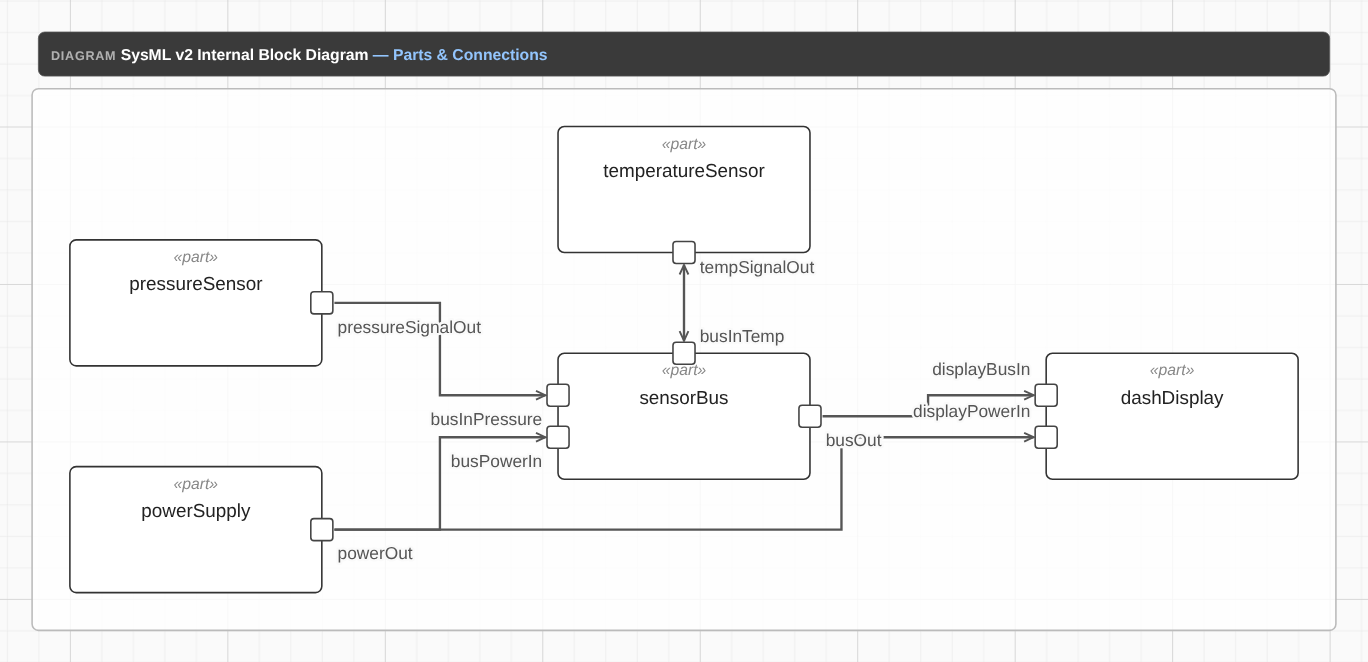
// Block usages (IBD cells) with typed boundary ports
block temperatureSensor {
  port tempSignalOut : temperatureSignal;
}
block pressureSensor {
  port pressureSignalOut : pressureSignal;
}
block sensorBus {
  port busInTemp : busChannel;
  port busInPressure : busChannel;
  port busOut : busChannel;
  port busPowerIn : powerFeed;
}
block dashDisplay {
  port displayBusIn : busChannel;
  port displayPowerIn : powerFeed;
}
block powerSupply {
  port powerOut : powerFeed;
}
// Multiplicity + subsets demo: a collection of temperature sensors.
block temperatureSensors [1..4] subsets temperatureSensor;

// Connections (port-to-port)
connect tempSignalOut .. busInTemp;
connect pressureSignalOut -> busInPressure;
connect busOut to displayBusIn;
connect powerOut -> (busPowerIn, displayPowerIn);
The Four Forms
- Undirected (`..`) — `connect tempSignalOut .. busInTemp;`. The temperature signal is exchanged between the sensor and the bus with no fixed direction; the connector is drawn with an arrowhead on each end.
- Directed (`->`) — `connect pressureSignalOut -> busInPressure;`. The pressure signal flows one way, sensor to bus; the connector is drawn with a single arrowhead at the target.
- Reference (`to`) — `connect busOut to displayBusIn;`. A plain binary connector that references the two ports; like `->` it is directional and drawn with a single arrowhead.
- N-ary (`(...)`) — `connect powerOut -> (busPowerIn, displayPowerIn);`. A single connector that joins three ports at once: the power supply feeds both the bus and the display, with power flowing out of powerOut into both.
Subsetting & Specialization
Two relationships let us relate one element to another, and they are easy to confuse. Specialization (`:>`) says one definition is a kind of another — it is the 'is-a' relationship between types. Subsetting says the instances of one feature are also instances of another — it is a relationship between features (usually usages) that lets a collection stand in for, or be a part of, a single feature.
First, the parts themselves. The sensor bus model has six block definitions — the 'blueprints' for each part. The temperature-sensors collection has its own definition, which the subsetting usage below references.
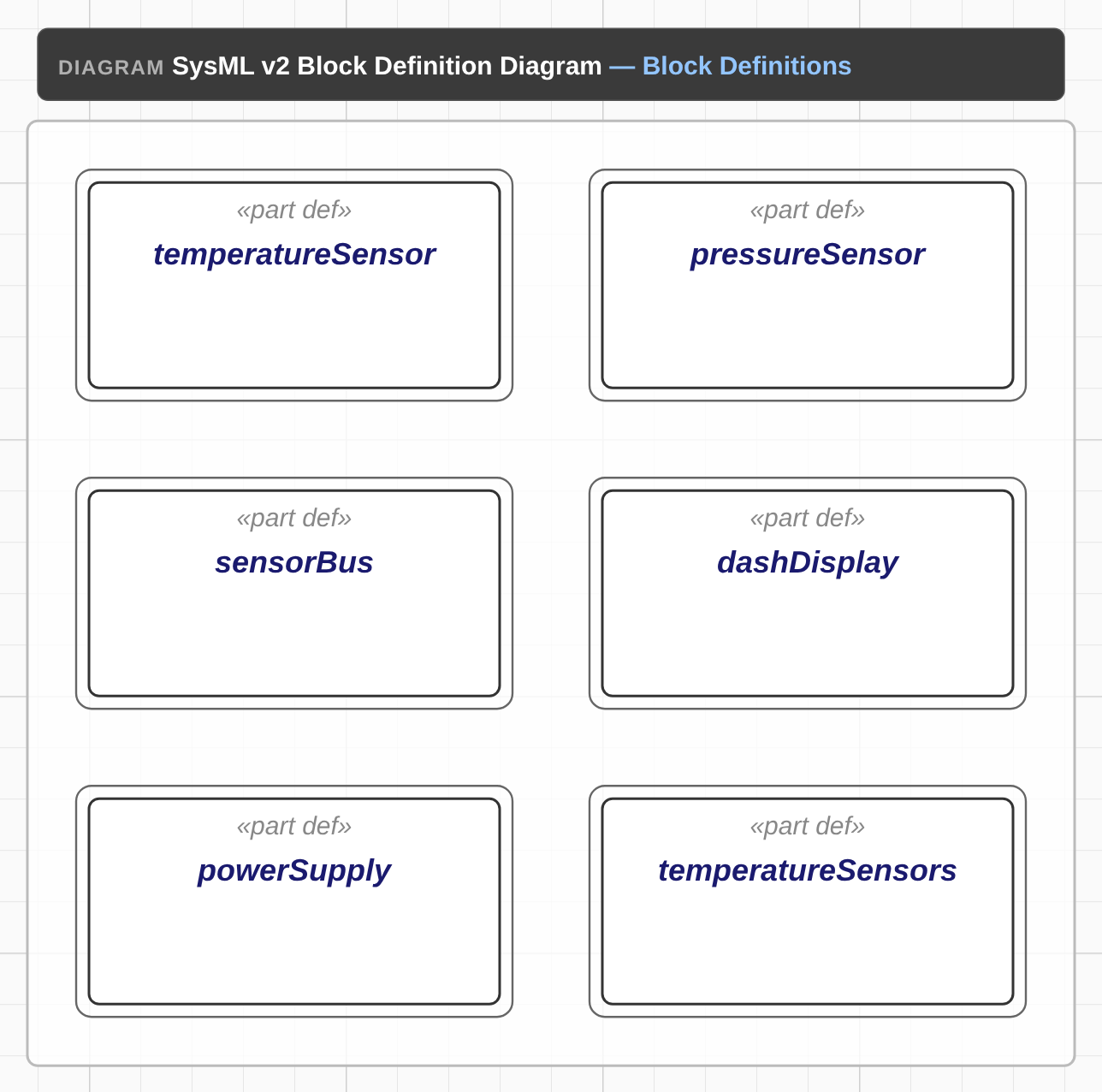
// Block definitions: the blueprints of each part
block def temperatureSensor {
  doc "Sensor that measures temperature";
}
block def pressureSensor {
  doc "Sensor that measures pressure";
}
block def sensorBus {
  doc "Central bus that aggregates sensor signals";
}
block def dashDisplay {
  doc "Dashboard display that consumes bus signals";
}
block def powerSupply {
  doc "Vehicle power supply";
}
// Definition for the subsetting collection usage.
block def temperatureSensors
Specialization (between types)
We already saw specialization in the port definitions: `temperatureSignal :> sensorSignal;` and `pressureSignal :> sensorSignal;`. Each specialized port is a kind of the base sensorSignal. Specialization is the 'is-a' relationship — it refines a type, and it is the mechanism behind the hollow-triangle generalization arrows in Figure 1.
Subsetting (between features)
Subsetting works on features, and in our model it appears on a usage. The temperatureSensors usage is a collection of temperature sensors, with a multiplicity of [1..4] (one to four of them). It subsets the single temperatureSensor usage: every member of the collection is also a temperatureSensor. This is how a 'fleet' of parts relates to the single part it is made of.
// Subsetting: a collection of temperature sensors, with a multiplicity
// of 1 to 4. Each member of the collection is also a temperatureSensor.
block temperatureSensors [1..4] subsets temperatureSensor;Reading the Diagram
Putting it all together, here is how to read the Internal Block Diagram (Figure 2). Each part is a cell; its boundary ports are the stubs on the cell's edge; and the connectors show how the parts are wired. The main signal path is:
- The temperature sensor's tempSignalOut is exchanged (undirected, `..`) with the bus's busInTemp
- The pressure sensor's pressureSignalOut flows (directed, `->`) to the bus's busInPressure
- The bus's busOut forwards the signal (reference, `to`) to the display's displayBusIn
- The power supply's powerOut feeds the bus's busPowerIn and the display's displayPowerIn through a single n-ary connector
One thing to notice: the n-ary power connector is a single semantic element with three endpoints, and the diagram draws it as a fan-out from the first endpoint — powerOut feeds both busPowerIn and displayPowerIn, so two directed lines leave the power supply, each with an arrowhead pointing into its target (power flows out of the supply). The temperatureSensors collection appears as a cell with no connectors of its own; it is related to the model by subsetting, not by a connector.
Common Pitfalls
Having modelled interfaces and connections in both SysML v1 and v2, here are the mistakes we see most often when people first work with v2 ports and connectors:
- Treating a connector as an untyped line — in v2 a connector links typed ports, and the port types are what make the connection meaningful and checkable
- Forgetting to type a port usage — a boundary port with no `: Type` reference is untyped and loses the interface relationship it should have
- Confusing subsetting with specialization — specialization (`:>`) is a kind-of relationship between types; subsetting relates one feature to another (a collection to the single feature it is made of)
- Using the wrong connector direction — a directed connector (`->` or `to`) fixes the flow one way; an undirected connector (`..`) allows either way; pick the form that matches the interaction
- Treating an n-ary connector as a set of pairwise links — the model records one connector with several endpoints (one shared interaction, here a common power rail); the diagram draws it as a fan-out from the first endpoint, but it is not a set of separate two-port connectors
What Comes Next
This tutorial went deep on the interfaces and connections that tie a system together. The other tutorials in the SysML v2 series cover the ground around it:
- Modelling a Powertrain in SysML v2 — the BDD + IBD walkthrough that introduced the running example, the block definitions, and the definition/usage distinction
- From SysML v1 to v2 — the migration story: block/compartments vs part/features, and what changes for v1 customers